Row performance and rendering
Row virtualization is a performance optimization technique used in Grid. Instead of rendering all the rows of data at once, which can be thousands of entries, row virtualization renders only the rows currently visible within the user's viewport (plus a small buffer). As the user scrolls, the Grid dynamically renders new rows and removes those that scroll out of view.
Alternatively, if you prefer to display data in discrete pages rather than continuous scrolling, you can use Pagination to also avoid rendering all rows at once.
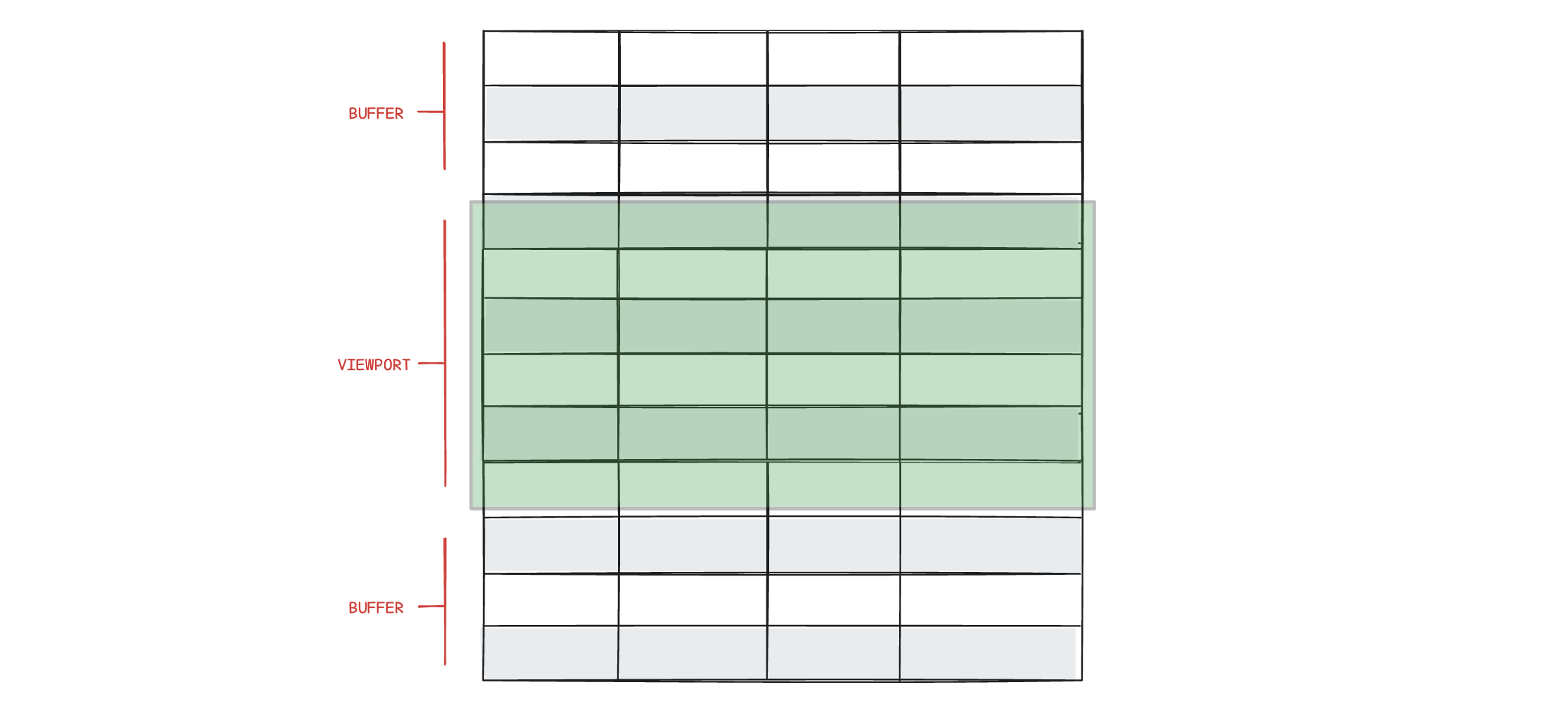
This technique significantly enhances performance, leading to faster load times and efficient updates. Row virtualization reduces memory consumption, allowing the application to handle large datasets smoothly without compromising performance. Users benefit from a smoother experience with fluid scrolling and more responsive updates.
Row virtualization can be set explicitly with the rendering.rows.virtualization option, or controlled automatically by rendering.rows.virtualizationThreshold (default 50).
Please note that large datasets also impact other interactions, including column resizing. Some animations or interactions might not be smooth.
Optimizing performance
{rendering: {rows: {bufferSize: 3, // default is 10strictHeights: true // default is false}}}
The rendering.rows.bufferSize and rendering.rows.strictHeights options can be adjusted to optimize performance and smoothness of scrolling based on your specific use case and preferences.
buffersize
Defines the number of rows rendered outside the viewport (the buffer) during scrolling. A small buffer leads to faster initial rendering and better scrolling performance. A larger buffer means slower initial rendering but might decrease the flicker effect on fast scrolling.
The default rendering.rows.bufferSize of 10 should be optimal in most cases.
strictHeights
By default, rows adjust their height to fit all content, which can reduce performance and scrolling smoothness. Setting strictHeights: true ensures all rows have a uniform height, truncating multiline text with an ellipsis. This skips height calculations and boosts performance.
minVisibleRows
Use rendering.rows.minVisibleRows to set a minimum tbody height based on how many rows should remain visible.
{rendering: {rows: {minVisibleRows: 4}}}
Wide data sets
Many columns affect performance the same way many rows do. Grid applies the same
technique horizontally: only the columns visible in the viewport are rendered,
automatically from 20 columns up. For very wide grids,
rendering.columns.strictWidths
additionally skips per-column width calculations. See
Column virtualization.
Rendering
{rendering: {table: {className: "custom_table_class"},header: {enabled: false // default is true},columns: {resizing: {mode: "adjacent"}}}}
These options can be used to configure how the table should be rendered.
rendering.table.className is appended to the <table> element.
rendering.header.enabled: false disables all column headers by not rendering the thead element.
rendering.columns.resizing.mode is used to configure column resizing behaviour. Read more about column resizing and width.