Share this

Using Angular.js with Highcharts

Mustapha Mekhatria Avatar

by

4 minutes read

Logo of Angular and Highcharts


AngularJS is a popular client-side framework for web applications. It provides enhanced HTML functionality, data binding, MVC pattern structure, routing support, and much more. In this article, we will go over some of the ways Highcharts can be used with AngularJS.

In its simplest form, Highcharts can be loaded and initialized in pure JavaScript from within an Angular controller or in plain JavaScript. The code below shows an example of a webpage using Highcharts (jsFiddle demo)

<!DOCTYPE html>
<html ng-app="myModule">
<head>
    <script src="https://ajax.googleapis.com/ajax/libs/angularjs/1.4.5/angular.min.js"></script>
    <script src="https://code.highcharts.com/highcharts.js"></script>
</head>
<body ng-controller="myController">
    <div id="container">Placeholder for chart</div>
    <script>
    	angular.module('myModule', [])
    		.controller('myController', function ($scope) {
				Highcharts.chart('container', {

				    xAxis: {
				        categories: ['Jan', 'Feb', 'Mar', 'Apr', 'May', 'Jun', 
				            'Jul', 'Aug', 'Sep', 'Oct', 'Nov', 'Dec']
				    },

				    series: [{
				        data: [29.9, 71.5, 106.4, 129.2, 144.0, 176.0, 135.6, 148.5, 216.4, 194.1, 95.6, 54.4]
				    }]
				});
    		});
    </script>
</body>
</html>

The code above is not optimal since it does not separate the presentation code from logic and data. It also does not take advantage of the extra functionality provided by Angular, such as data binding, for example. One approach to optimizing the code is to write a simple custom Angular directive for Highcharts. This would allow us to follow Angular’s patterns for code separation and reuse. A generic directive might take chart options as an argument. A second approach would be to write a directive for each chart template used, providing the data as an argument. Check the following example to learn more about how to use a custom Angular directive for Highcharts (jsFiddle demo):

<!DOCTYPE html>
<html ng-app="myModule">
<head>
    <meta charset="utf-8" />
    <title> Highcharts directive demo </title>
    <script type="text/javascript" src="https://ajax.googleapis.com/ajax/libs/angularjs/1.4.5/angular.min.js"></script>
    <script type="text/javascript" src="https://code.highcharts.com/highcharts.js"></script>
</head>
<body ng-controller="myController">

     <hc-chart options="chartOptions">Placeholder for generic chart</hc-chart>
     <hc-pie-chart title="Browser usage" data="pieData">Placeholder for pie chart</hc-pie-chart>

    <script>
        angular.module('myModule', [])
            // Directive for generic chart, pass in chart options
            .directive('hcChart', function () {
                return {
                    restrict: 'E',
                    template: '<div></div>',
                    scope: {
                        options: '='
                    },
                    link: function (scope, element) {
                        Highcharts.chart(element[0], scope.options);
                    }
                };
            })
            // Directive for pie charts, pass in title and data only    
            .directive('hcPieChart', function () {
                return {
                    restrict: 'E',
                    template: '<div></div>',
                    scope: {
                        title: '@',
                        data: '='
                    },
                    link: function (scope, element) {
                        Highcharts.chart(element[0], {
                            chart: {
                                type: 'pie'
                            },
                            title: {
                                text: scope.title
                            },
                            plotOptions: {
                                pie: {
                                    allowPointSelect: true,
                                    cursor: 'pointer',
                                    dataLabels: {
                                        enabled: true,
                                        format: '<b>{point.name}</b>: {point.percentage:.1f} %'
                                    }
                                }
                            },
                            series: [{
                                data: scope.data
                            }]
                        });
                    }
                };
            })
            .controller('myController', function ($scope) {
                
                // Sample options for first chart
                $scope.chartOptions = {
                    title: {
                        text: 'Temperature data'
                    },
                    xAxis: {
                        categories: ['Jan', 'Feb', 'Mar', 'Apr', 'May', 'Jun', 
                            'Jul', 'Aug', 'Sep', 'Oct', 'Nov', 'Dec']
                    },

                    series: [{
                        data: [29.9, 71.5, 106.4, 129.2, 144.0, 176.0, 135.6, 148.5, 216.4, 194.1, 95.6, 54.4]
                    }]
                };

                // Sample data for pie chart
                $scope.pieData = [{
                        name: "Microsoft Internet Explorer",
                        y: 56.33
                    }, {
                        name: "Chrome",
                        y: 24.03,
                        sliced: true,
                        selected: true
                    }, {
                        name: "Firefox",
                        y: 10.38
                    }, {
                        name: "Safari",
                        y: 4.77
                    }, {
                        name: "Opera",
                        y: 0.91
                    }, {
                        name: "Proprietary or Undetectable",
                        y: 0.2
                }]
            });
    </script>
</body>
</html>

The above example could also be expanded using Angular’s watch functionality. In combination with its data binding, this could allow changes in the underlying data to update automatically the chart.

There are several more complex open source Angular directives for Highcharts. Learn more about the most popular directive for Highcharts. This directive is not maintained or officially supported by Highcharts, but remains popular among Highcharts’ developers and users.

Stay in touch

No spam, just good stuff

We're on discord. Join us for challenges, fun and whatever else we can think of
XSo MeXSo Me Dark
Linkedin So MeLinkedin So Me Dark
Facebook So MeFacebook So Me Dark
Github So MeGithub So Me Dark
Youtube So MeYoutube So Me Dark
Instagram So MeInstagram So Me Dark
Stackoverflow So MeStackoverflow So Me Dark
Discord So MeDiscord So Me Dark

Comments

  1. Samuel Dunlap

    |

    For those wanting their highchart to update when the data does, just change the link function in the hcChart directive to:
    link: function (scope, element) {

    Highcharts.chart(element[0], scope.options);

    scope.$watch(‘options’, function(newVal) {
    if (newVal) {
    Highcharts.chart(element[0], scope.options);
    }
    }, true);
    }


    1. Renan Moreira Santos

      |

      Very well! Thanks!


    2. Gonzalo Merciel

      |

      I think you should destroy the chart before you create a new one, or (better) update options to the current chart:

      link: function (scope, element) {

      var chart = Highcharts.chart(element[0], scope.options);

      scope.$watch(‘options’, function(newVal) {
      if (newVal) {
      chart.update(scope.options);
      }
      }, true);
      }


      1. Daniel Ávila Méndez

        |

        This is very useful. Thanks so much.


    3. Rizki Fahruroji

      |

      Thanks a lot, but what about the pie?


  2. Ashish Kumar

    |

    How to plot synchronized highchart with angularjs???


    1. Øystein

      |

      See http://jsfiddle.net/gh/get/library/pure/highcharts/highcharts/tree/master/samples/highcharts/demo/synchronized-charts/ for a demo on synchronizing charts. You should be able to use this approach, except instead of using jQuery to add the charts to the DOM, you would use an Angular approach. For more detailed help, please contact our customer support or ask a question on StackOverflow. Our support engineers will be happy to help you.


  3. Ricardo Filho

    |

    How to use charts with async data? I have a service providing external data, but when i pass the value to frontend nothing happens.

    // Controller
    utilsFactory.getCustom(‘api/dashboard’) // service with external data, receives a promise
    .then(function(response){
    $scope.pieData = response.data
    }).catch(function(error){
    console.log(error);
    });

    // HTML


    1. Øystein

      |

      To support dynamic data you will have to call setData on the series of the chart you are trying to change. It might be easier for you to use a more feature complete angular directive at this point, such as https://github.com/pablojim/highcharts-ng.


  4. Kavitha Velayutham

    |

    I am using the same code as yours, but I am getting the following error
    highcharts.js:8 Uncaught TypeError: a.Highcharts.error is not a function


    1. Øystein

      |

      Hi Kavitha, please share your code and contact our support (https://www.highcharts.com/support), they will be happy to help you out.


    2. Kavitha Velayutham

      |

      Thanks for the quick response. Its version Issue Fixed it.


  5. Rohit Ghosh

    |

    Hi , how can we insert background image something like mountains in the chart ?


  6. Manpreet

    |

    can you provide me the solution of getting the json data from url: “https://www.highcharts.com/samples/data/jsonp.php?filename=usdeur.json&callback=?” and setting it on highchart and polling the data from url after 1 sec and displaying the data in moving manner in angular js.. just like moving live data.


  7. Hiren

    |

    This post is very easy to understand and more help full. i want to need here some changes in the chart any one do that then please help me and tell me how can do that. right now i am show current to last 7 days date wise data. date like 06-10-2017 to 12-10-2017 date is show in the x-axis but now i want to get more dates like more 7 dates want on x-axis replace to 06-10-2017 to 12-10-2017 to 29-09-2017 to 05-10-2017 want. so how can do that any idea about is than please tell me.


    1. Øystein

      |

      Hi Hiren, are you using Highstock? If so, take a look at our Navigator and the navigator options: https://www.highcharts.com/docs/chart-concepts/navigator.
      If you are using Highcharts, you can set the min/max of the xAxis using the xAxis options: http://api.highcharts.com/highcharts/xAxis.min.
      Hope this is of help to you.


      1. Hiren

        |

        I am using HighCharts version 6.0.1. Have set up the Highcharts with angularjs server locally for exporting the charts. When download as png/jpeg/pdf is selected from the top right corner of the chart , the Highcharts demo page is displayed and i am redirect to other link “https://export.highcharts.com/”. so how can stop this redirection can you please help me.


        1. Øystein

          |

          Hi, to help you with this, please contact our support. See https://www.highcharts.com/support. Make sure to include your code so we can see what you are doing.


          1. Hiren

            |

            thanks for your replay i have fix it that problem using just put this offline-exporting.js in the page. and for that
            “set the min/max of the xAxis using the xAxis options: ” do you have any example or any fiddle then if you possible then tell me.


          2. Øystein

            |

            Hi Hiren, sounds good. See here for an example using yAxis, it would be the same for the xAxis: http://jsfiddle.net/az7j1eyz/. The xAxis.min and max options can be set in the Highcharts options.


          3. Hiren

            |

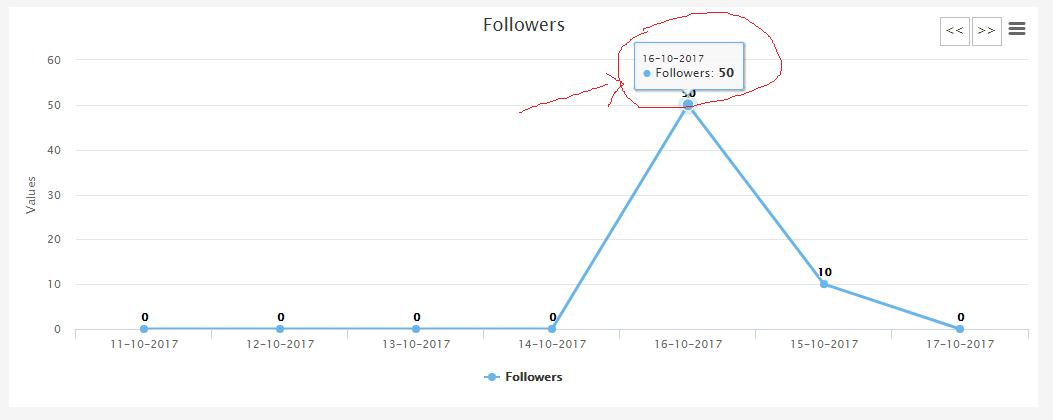
            i have 3 array. 1st array store Dates.2nd array store Followers count, and 3rd array store string. so i want 3rd array in the tooltip. right now in the tooltip show just followers count now i want to also show 3rd array data. so how can do that any idea about this then please tell me.

            https://uploads.disquscdn.com/images/d7e85f97de2aae395909688775536ebce31e9215383e64a5b6ed85407da49383.png

            see in the image right in the tooltip show just count now i want to also my 3rd array value in the tooltip so how can do that any idea.


          4. Øystein

            |

            Hi, you can use the “series.keys” option (http://api.highcharts.com/highcharts/plotOptions.series.keys) to set which array elements map to which point property. Then you can use the “tooltip.pointFormat” (http://api.highcharts.com/highcharts/tooltip.pointFormat) to get the property from the point and display it. For more detailed help, feel free to contact our support, see https://www.highcharts.com/support.


          5. Hiren

            |

            Thank you so much for your replay


      2. Hiren

        |

        thanks for your replay i will look that. can you please help me.


  8. fatema

    |

    how shall i update my chart with new data if i have the same code as above ?


  9. shruthi

    |

    I had a question.
    I want to display highcharts based on checkbox in Angular JS. How do I do it?


  10. rajkamal kamal

    |

    I have a question.
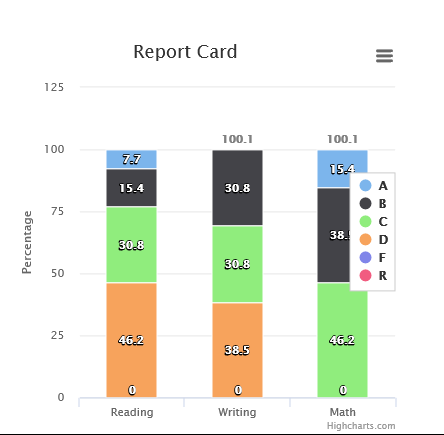
    i want to display more than one highcharts based on the selection.
    if i select one school data then it display one chart if i select n school data then it display n charts in same container.
    here is my highchart https://uploads.disquscdn.com/images/474ff32334f8e8e6451efb25711ec57f21ed9ba76baf8fc4053336d7f8d35ab9.png


    1. Jon Arild (Highsoft)

      |

      Hi Rajkamal, please contact our technical support at [email protected] and they will assist you.

      Best regards
      Jon


      1. rajkamal kamal

        |

        Thanks Jon.


  11. jaimin Soni

    |

    how to update axis title inside angularjs controller.
    I hace created directive highchart

    //inside .html page————————————————–
    Placeholder for generic chart

    //inside .js page—————————————————-
    App.directive(‘hcChart’, function ($parse) {
    ‘use strict’;
    return {
    restrict: ‘E’,
    replace: true
    ,
    template: ”,
    link: function (scope, element, attrs) {
    attrs.chart = new Highcharts.chart(element[0], {

    xAxis: {
    title: {
    text: “Date”
    },
    type: ‘datetime’
    // labels: {
    // step: 24
    // }
    // ,
    // tickInterval: 2
    },
    yAxis: {
    title: {
    text: “Value”
    }
    },
    dataLabels: {
    enabled: true
    }
    ,
    title: {
    text: “”
    },
    // Scope to watch categories
    scope.$watch(function () {
    return attrs.categories;
    }, function () {
    console.log(“inside categories watch : “);
    if (attrs.chart.xAxis.length === 0) {
    attrs.chart.addAxis($parse(attrs.categories)(scope));
    } else {
    attrs.chart.xAxis[0].setCategories($parse(attrs.categories)(scope));
    }
    });
    // scope to watch series
    scope.$watch(function () {
    return attrs.series;
    }, function () {
    var i;
    for (i = 0; i < $parse(attrs.series)(scope).length; i++) {
    if (attrs.chart.series[i]) {
    attrs.chart.series[i].setData($parse(attrs.series)(scope)[i].data);
    } else {
    attrs.chart.addSeries($parse(attrs.series)(scope)[i]);
    }
    }
    // remove series if new array passed is smaller
    if (i i; j–) {
    attrs.chart.series[j].remove();
    }
    }
    });
    }
    };

    how to update axis title similar to series and categories being changed using watch? or can it be changed


    1. jaimin Soni

      |

      To change yAxis title inside angularjs controller, we need to set its property:

      Highcharts.charts[0].yAxis[0].setTitle({
      text: $scope.NAME
      });


    2. Irfan Khan

      |

      Have you found any solution for that?


      1. Jaimin Soni

        |

        To change yAxis title inside angularjs controller, we need to set its property:

        Highcharts.charts[0].yAxis[0].setTitle({
        text: $scope.NAME
        });


Leave a Reply to Ricardo Filho Cancel reply

Your email address will not be published. Required fields are marked *

This site uses Akismet to reduce spam. Learn how your comment data is processed.