
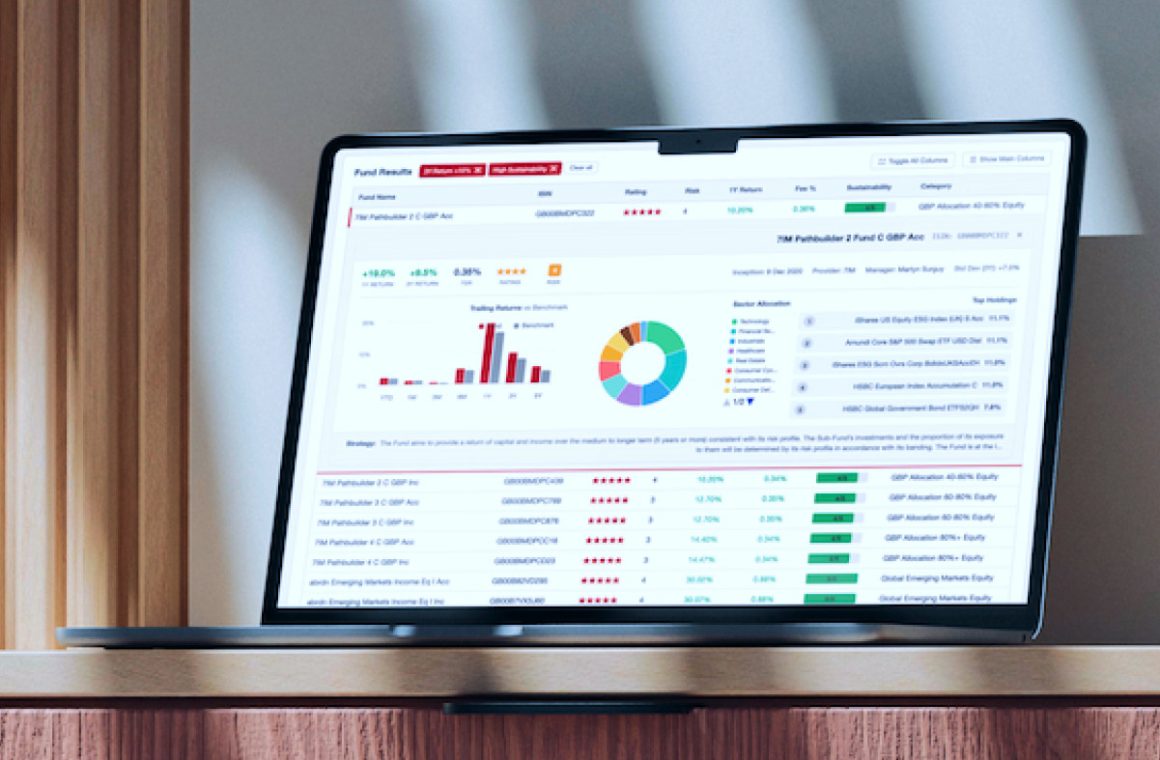
A fund screener is one of the most valuable features you can add to a financial platform. It’s also one of the most expensive and time-consuming to build.
To build a fund screener that clients actually want to use, you need access to thousands of funds, each with ratings, risk scores, fees, performance history, asset allocation, and sustainability data. Beyond just access, you also need data that is structured, reliable and updated regularly.
Most teams discover this problem after they’ve already committed to building the feature. What looked like a few weeks of frontend work turns into months of API contracts, authentication headaches, data mapping, and ongoing maintenance.
But what if the data problem is already solved?
That’s where the Highcharts Morningstar data connector comes in. It handles all the backend plumbing so your team can focus on building the product experience.
Pair the connector with Highcharts and you can go from pure Morningstar data to a fully interactive fund screener in days, not months.
Trusted data, out of the box
A fund screener lives or dies on the quality of its underlying data. To build one that finance professionals and clients actually trust, you need coverage that goes beyond basic price data.
The Morningstar Investment Screener connector gives you access to Morningstar’s full investment universe (over 65,000 funds) filterable across dozens of data points including asset class, Morningstar rating, risk score, one-year return, fee percentage, sustainability rating, region, and category.
This is the same, top-quality Morningstar data that wealth managers and financial advisors rely on to make recommendations and data your users will immediately trust when they see it.
How the connector works
The connector handles the authentication, data mapping, and API integration automatically. Just configure your Morningstar credentials once, and the data flows directly into your front-end layer, structured, reliable, and ready to visualize.
Since your data never passes through Highcharts’ servers, security, privacy, and regulatory compliance stay entirely within your infrastructure.
For more technical information about the data connector, check out our Morningstar Data Connector documentation.
What you else can build
The Fund Screener is just the starting point. Once a user finds a fund they’re interested in, the next logical step is a detailed fund profile. That’s where the Security Details connector picks up.
From the screener, a user can select a fund to see a profile summary.
If you want to present more in-depth analysis, you can build a full fund profile dashboard using Highcharts Dashboards. Drop in a sector breakdown, calendar year returns, trailing performance, stock style, asset allocation, and underlying holdings in a single view.
This is the kind of investment research experience that typically takes months to build. With the Morningstar connector handling the data layer, it’s possible to have a fully interactive fund screener running with real Morningstar data in days, freeing up your team to focus on product experience, not plumbing.
Getting started
To get started with the Morningstar connector, you’ll need a Highcharts Partner Data License and a Morningstar Direct Web Services account.
The Partner Data License includes the connector, Highcharts Stock for one SaaS or web app, unlimited developer seats, and Advantage Plus support, including a dedicated Support Engineer who will guide you through implementation.
Have questions about your specific use case or want to see the connector in action? Reach out to our team to get started.
Highcharts has been trusted by financial institutions for 15 years, including 80% of Fortune 100 companies. The Morningstar partnership is built on that same foundation of reliability, security, and dedicated support.







Leave a Reply