
As organizations adopt interactive analytics across more products and teams, governance becomes just as important as the analytical tools themselves. Administrators need to control where tools are deployed, who can access them, which capabilities are available, and how experiences remain consistent across applications. Orbit Admin gives you that control.
Orbit Admin is a centralized control panel for managing Orbit deployments. Instead of configuring every application individually, you create installations, manage access, control feature availability, set organization-wide defaults, and monitor usage from a single interface.
Whether you’re embedding Orbit into one application or dozens, Orbit Admin keeps administration manageable as you scale.
A central dashboard for your Orbit deployment
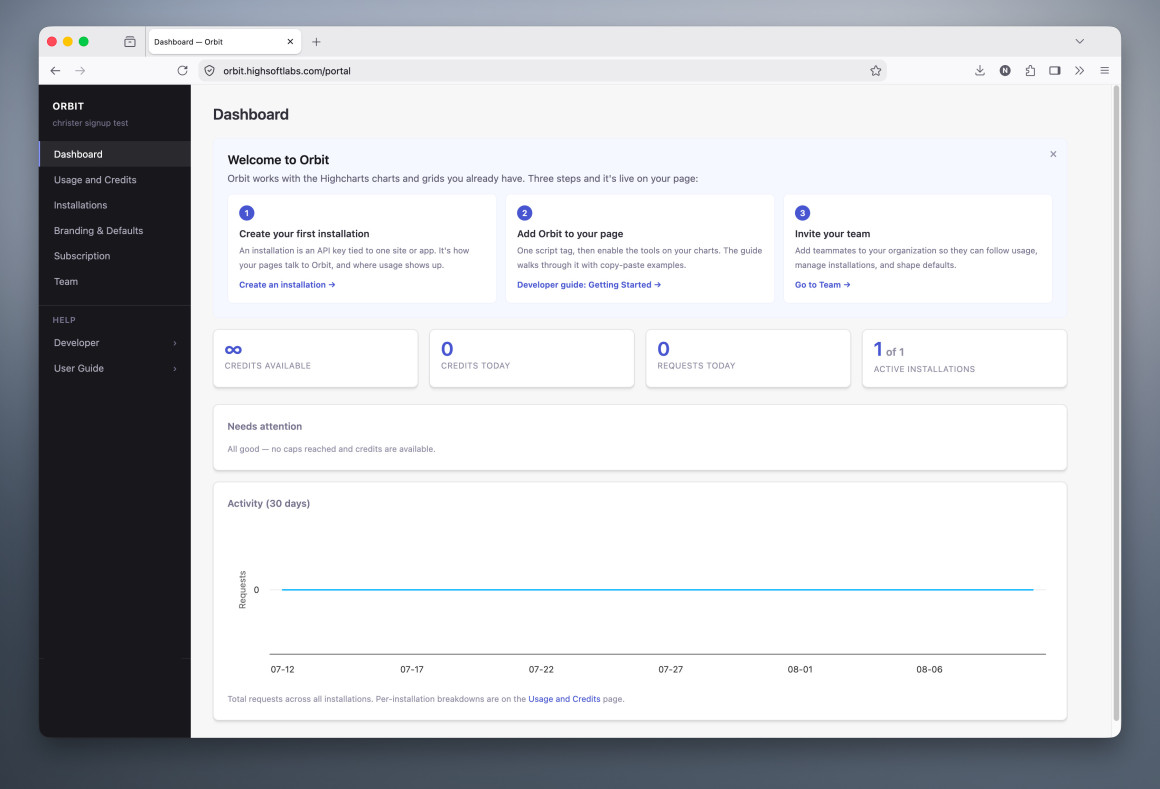
Orbit Admin opens with a dashboard that gives you a single operational view of your entire deployment. You can monitor installations, API activity, available credits, and recent usage, while alerts highlight anything that needs attention.
As you create more installations and adoption grows, this dashboard becomes your starting point for tracking usage trends across the organization.
Create installations for every application
As Orbit adoption grows across your organization, the Installations section becomes a convenient starting point for creating Orbit installations.
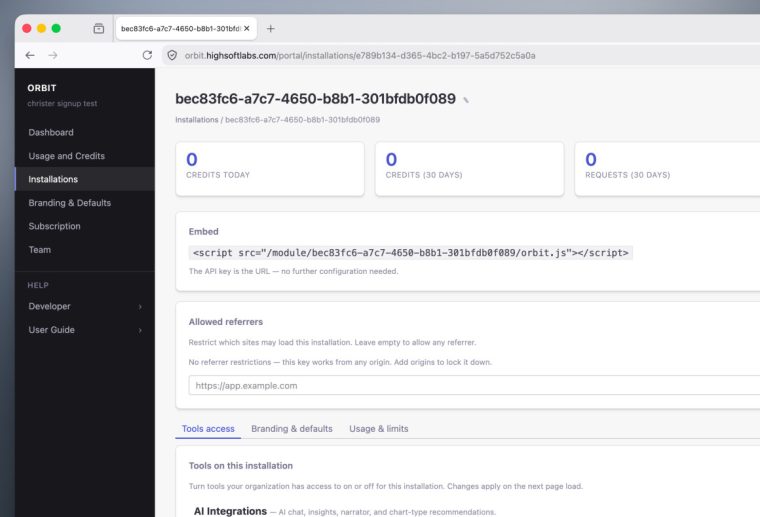
Each new Orbit installation generates a unique embed URL you add directly to your application. From there, you can manage each installation’s configuration independently.
Allowed referrers restrict where an installation loads, so security is built into the deployment process. You can also activate or deactivate installations, monitor request activity, and configure usage limits when needed.
Tailor the Orbit experience for each deployment
Not everyone needs the same analytics experience. Analysts may need access to every tool, while executives may only need a few.
Each Orbit installation page comes with a Tools Access section that lets you pick and choose which Orbit tools to expose to your end users.
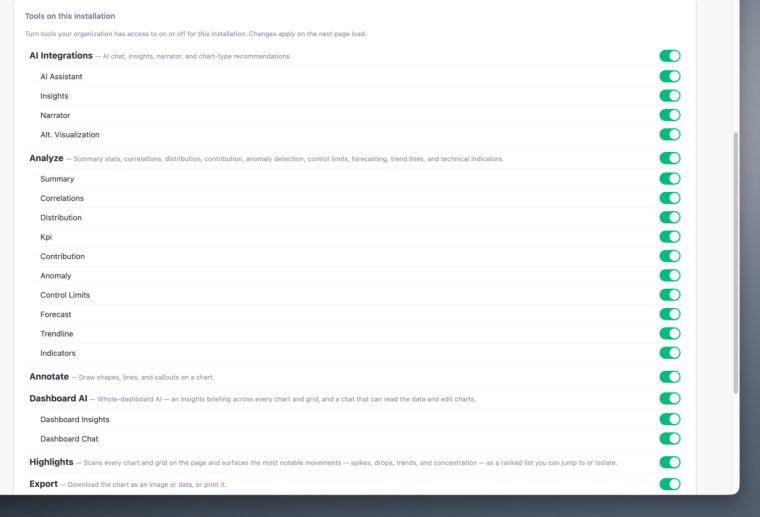
Features you can toggle on/off include:
- AI-powered capabilities such as AI Assistant, Insights, Narrator, and Dashboard AI
- Analysis tools including Forecast, Correlations, Anomaly Detection, Trendlines, Control Limits, KPIs, and Summary Statistics
- Supporting capabilities such as Highlights, Export, Annotation, and Transform
Because you manage these settings centrally, you can build different Orbit experiences for different audiences without editing code or maintaining separate deployment processes.
Apply branding and defaults across your organization
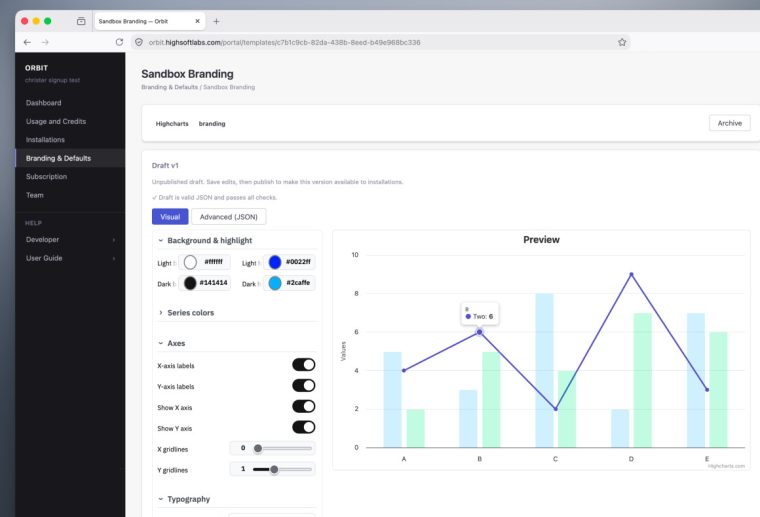
Centralized branding and configuration management is one of Orbit Admin’s core capabilities.
Instead of configuring individual charts one at a time, you create reusable templates that define global styling and behavioral defaults. Edit visual settings, like colors, typography, axes, legends, backgrounds, tooltips, through a visual interface or directly as JSON.
Once published, a template applies automatically across the Orbit installations you select, before charts render. For teams managing large numbers of dashboards, that means publishing a branding update once instead of touching every chart individually.
Monitor usage and control API consumption
The Usage & Credits section gives you detailed information about requests, credit consumption, usage caps, and rate limits.
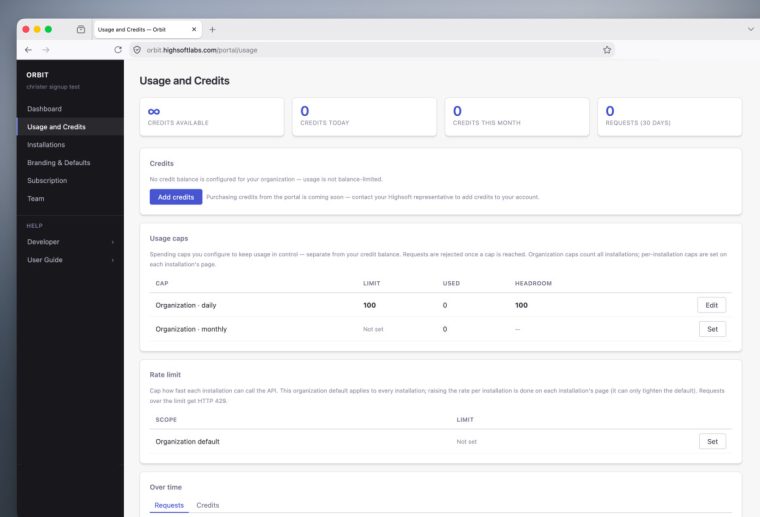
Combine organization-wide limits with installation-specific settings to balance resource management against the needs of individual applications.
Historical request data also helps you understand adoption trends as Orbit deployments grow.
Manage users and organizational access
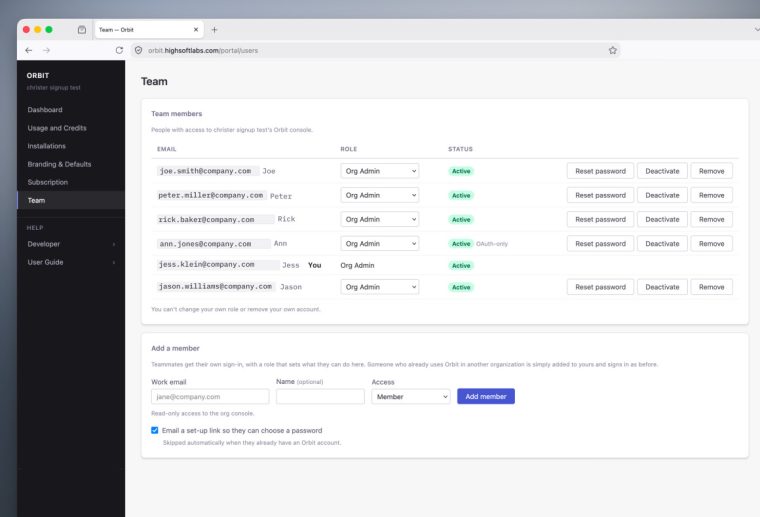
The Team section centralizes user administration for the Orbit organization. Invite new members, assign roles, reset passwords, and manage access from a single location as your deployments expand.
Start scaling your Orbit deployments
Whether you’re embedding Orbit into a single application or rolling it out across multiple teams, Orbit Admin gives you the tools to configure, manage, and scale the deployment.
Paired with Orbit’s built-in analytics, AI capabilities, and collaborative workflows, it lets you run interactive analytics consistently across your applications without adding operational overhead.
Orbit is currently available in beta. If you’d like to explore it with your own data, sign up for access and we’ll email you everything you need to start adding interactive analytics directly to your Highcharts charts.
If you’re not already using Highcharts, you can get started via npm:
npm install highchartsOr head to highcharts.com/download for other installation options.






Leave a Reply