
When an investor or advisor selects a fund from a screener, they expect to land somewhere that answers their questions. Not just a name and star ratings, but the full picture. How has this fund performed over time? What does it actually hold? How is the risk distributed? How does it compare to its benchmark?
If your fund profile page can’t answer those questions clearly and credibly, you’ve lost them. They’ll go back to Morningstar, Bloomberg, or wherever they came from.
Assembling a fund profile that finance professionals actually trust means sourcing performance history, risk metrics, sector allocation, holdings, regional exposure, ESG scores, and fees. This often involves accessing data via multiple APIs, keeping them sync, and presenting the data in a consistent manner. That’s the kind of project that starts as a two-week build and becomes a two-month one.
The Highcharts Morningstar Security Details connector solves the data layer entirely. One connection, no custom pipelines or stitching together multiple APIs. And when your users see Morningstar data on your platform, they’ll recognize it immediately and trust in your product.
The full depth of Morningstar fund data, in a single connection
The Morningstar Security Details connector gives you everything you need for a complete fund profile in a single connection. If you have a security’s ISIN, CUSIP, ticker, or Morningstar ID, you can access:
Performance and risk — trailing returns, calendar year returns, benchmark comparisons, standard deviation, Sharpe ratio, and risk rating. The numbers that tell you not just what a fund returned, but whether it was worth the risk.
Allocation and holdings — asset allocation across stocks, bonds, and cash; sector distribution across industries; top underlying securities and their portfolio weights; regional exposure by country. The breakdown that shows investors what they’re actually invested in.
Trust signals — ESG sustainability ratings, total expense ratio, and Morningstar’s own proprietary ratings and research. This is the same data that powers Morningstar’s platform. Your users will recognize it the moment they see it.
The connector handles authentication, data mapping, and API integration automatically. Your data never passes through Highcharts’ servers, so security, privacy, and regulatory compliance stay entirely within your infrastructure.
For technical implementation details, see the Security Details connector documentation.
What it looks like in production
Take the BlackRock Income and Growth Ord fund profile as a real example.
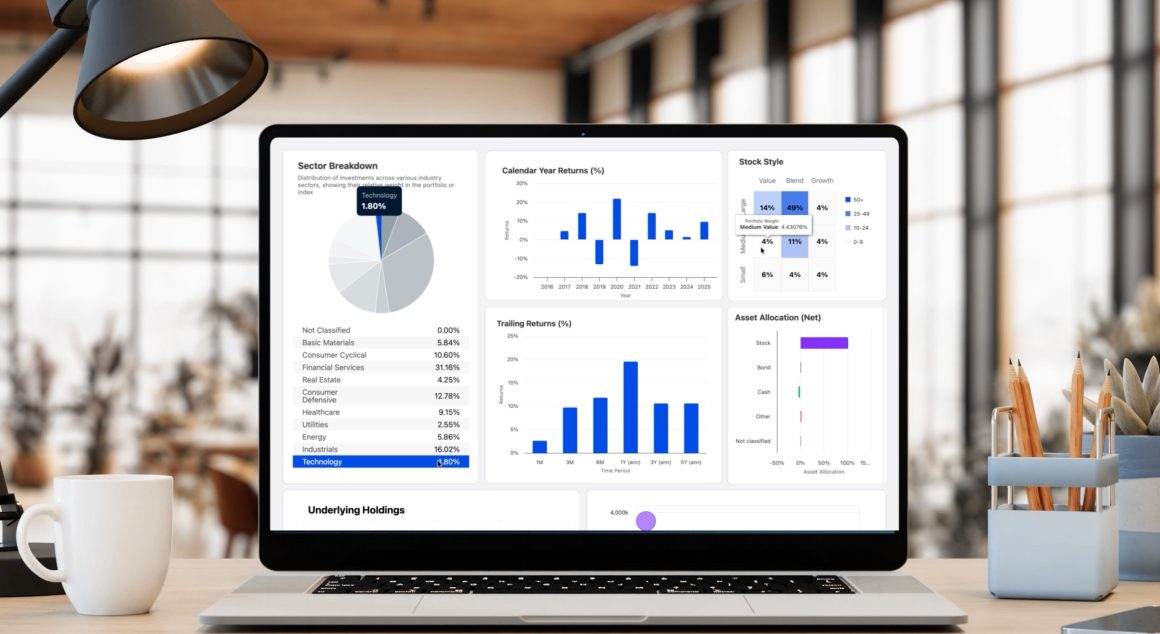
At the top, a sector breakdown chart shows how the fund is distributed across industries. Alongside it, calendar year returns from 2016 through 2025 give a long view on performance, and a stock style grid places the fund in its category at a glance. Below that, trailing returns compare the fund against its benchmark across multiple time periods, and an asset allocation chart shows the split between stocks, bonds, cash, and other assets.
Further down, a holdings table lists the top securities by portfolio weight alongside market value and sector. A bubble chart visualizes those same holdings by weight and index position. A regional breakdown shows geographic exposure by country.
One connector powers all of it. The single exception is the Performance Trends chart at the bottom that uses the Time Series connector to track price history over a full date range with navigator and zoom controls. A complete fund profile typically combines both, each feeding the relevant components in a single synchronized view through Highcharts Dashboards.
This is the kind of investment research experience that typically takes months to build from scratch. With the Security Details connector handling the data layer, most teams have a complete fund profile running with real Morningstar data in days.
Getting started
The fund profile is one of five production-ready use cases built on the Morningstar connector library. Most teams start here as the natural next step after building a fund screener, and it’s where investors spend the most time making decisions.
To build it, you’ll need a Highcharts Partner Data License and a Morningstar Direct Web Services account. The license includes the connector, Highcharts Stock and Dashboards for one SaaS or web app, unlimited developer seats, and Advantage Plus support, including a dedicated Support Engineer who will guide you through implementation.
Have questions about your specific use case or want to see the connector in action? Reach out to our team to get started.
Highcharts has been trusted by financial institutions for 15 years, including 80% of Fortune 100 companies. The Morningstar partnership is built on that same foundation of reliability, security, and dedicated support.







Leave a Reply