Share this

Highcharts Performance Boost

News Avatar

by

3 minutes read

Multiple racing cars on racing field

____

This post is now outdated. The latest updates on the Highcharts Boost module can be found here. 
____


We are proud to reveal a preview of something we have been working on. The boost.js module is a module to allow quick loading of hundred thousands of data points in Highcharts.

Highcharts is fast and reliable when handling a reasonable amount of data points (up to many thousands, and hundreds of thousands with data grouping). The only thing with all SVG based charting solutions, is that the performances decrease when trying to add hundreds of thousands of points, due to the need to add hundreds of thousands of SVG elements to the DOM.

In addition, the process of adding those points is slow, and the mere amount of objects also slows down all interaction with the chart, such as the responsiveness of the tooltip while hovering.

The HTML5 canvas technology does not have these limitations, but a pure canvas rendering solution would mean that we abandon SVGs strengths like DOM access, per-item event handling, and sharp rendering across screen resolutions. So we sought a way to get the best of two worlds. We tried using a foreignObject inside the SVG, but IE didn’t like that so we ended up drawing the graph on a canvas, then copying over the contents to an image tag inside the SVG, using a data URL. We were glad to see that this solution performs really well!

The Boost module is still a work in progress, but we are now open for input from our community, and will respond to bug reports on the module.


ONE MILLION SCATTER POINTS

To keep the story short, along with a few other optimizing tweaks, we are now able to create a chart with one million scatter points in less than 200 milliseconds! That’s how long the chart takes to initialize, and after that the points are rendered in asynchronous chunks for about two seconds. By doing this async we get the impression of animation, while avoiding to lock the browser thread.

Furthermore, other series types including line, area or column are even faster, as they don’t have to render every point. The user can’t see 500 point in a single horizontal pixel anyway, so the data is sampled down.


DEMOS

Stay in touch

No spam, just good stuff

We're on discord. Join us for challenges, fun and whatever else we can think of
XSo MeXSo Me Dark
Linkedin So MeLinkedin So Me Dark
Facebook So MeFacebook So Me Dark
Github So MeGithub So Me Dark
Youtube So MeYoutube So Me Dark
Instagram So MeInstagram So Me Dark
Stackoverflow So MeStackoverflow So Me Dark
Discord So MeDiscord So Me Dark

Comments

  1. SuryaMDV

    |

    Is boost.js module still a work in progress?


    1. Chris V

      |

      Hi,

      the boost module is considered “experimental” still, and is also under active development and maintenance.

      That said, it’s pretty stable, and works well with most common chart types (column, line, heatmap, bubble, scatter, treemap..). We consider it production-ready, with the caveat that “your milage may vary” depending on your use case.


      1. vik ram

        |

        Hello, I am facing issue while rendering the data in column chart around 9000 (thousand) points with ‘stacking:normal’ and its taking too much time to load the data in IE and Chrome(taking around 5-12 secs each time when i request the data from server in paging mode) but when i comment the ‘stacking:normal’ it works fine and quite fast and taking less than 2 secs. but my requirement with ‘stacking:normal’.
        Any suggestion how i can resolve the issue and optimize the performance using stacking option ?

        For reference the data please check below link
        http://jsfiddle.net/fa79n3yt/6/


  2. Damian

    |

    It causes such a problem – I have made a custom Series (candlestick extension) – and it works very good to the point where I want to add more than 9 series to the chart – it crashes at chart.redraw() (more precisely at series.translate()). Also crashes the same way with ohlc extension, but doesn’t with column extension. Disabling boost.js solves it all.


    1. Chris V

      |

      Hi,

      only lines, columns, heatmap, treemap, scatter, and bubble is supported in boost at this time. The reason it’s fine with less than 10 series is that the boost doesn’t kick in by default until there are 10 series in the chart, or if there are any series with more than 5000 points in it.

      Best,
      Chris


  3. Meenakshi Avasarala

    |

    I am trying to plot a large tree map with nearly 7500 records and it takes a lot of time nearly 2 minutes to draw the graph. Anything could be done to speed up this?


    1. Chris V

      |

      Hi,

      which settings are you using for activating the boost?

      Thanks,
      Chris


      1. Meenakshi Avasarala

        |

        I did not use any settings to activate the boost. I would like to know if there are any settings to speed up the performance of a large tree map. Eg: http://jsfiddle.net/t1d4s0of/ this fiddle takes lot of time to load, since it has large amount of data. I have similar case in my project, where I need to show 7500 records in large tree map. When I try to plot , browser hangs


        1. Chris V

          |

          Hi,

          if you want to enable boost for treemaps, you need to include the boost module.

          It likely won’t have a huge effect on that dataset though, and there’s not a whole lot you can do apart from what you’ve already done. Utilizing levels is the best way to speed up performance.

          However, there’s an update coming in the next Highcharts release that greatly increases performance to treemaps in general (in our tests we went from ~100 seconds draw time to ~1.8 seconds).

          Best,
          Chris


  4. naga manikanta

    |

    I am trying to plot a spark line chart with 1000 data points or 5000 data points but its taking much time to plot and browser is asking to kill page.
    Is there any solution is speed up to plot chart


    1. Chris V

      |

      Hi,

      could you post your chart configuration (minus the data if you’d rather not share that)?

      Thanks,
      Chris


  5. Martin Nyaga

    |

    Hi,

    I have been developing some custom visualisation components based on Highcharts. I implemented the boost module in a scatter to improve the performance with larger amounts of data, and that worked great to speed up rendering. However, I realised that my event handlers on the point object (necessary for custom workflows in the component) no longer work.

    Is this a known limitation of the boost module, or can I enable them somehow?

    Thanks,
    Martin


    1. Chris V

      |

      Hi Martin,

      this is a limitation of the boost module itself, as there is nothing to attach events to when boosting.

      Unfortunately, I can’t think of any workarounds that wouldn’t be quite involving. That said, we have been talking about this internally previously as well, so support may come at some point in the future.

      Best,
      Chris


  6. Huu Tam

    |

    Hi,
    I am currently using HighCharts for report features of our big data project, so that I include the boost module in. After that, I faced some problems as below:
    1. With scatter/bar/line, when the number of series is >= 10, the chart is not rendering.
    2. With exporting csv with lots of data, the result csv file contains the header only, without any data

    Do you have any idea how to solve these problem ? Or is there any property I have to configure ?

    Thanks,
    Tam, Thai Huu


    1. Chris V

      |

      Hi,

      could you share your chart configuration please? By default, the boost kicks in when there’s more than 10 series in your chart, and boost is included. It’s likely that some part of the configuration is not “boost friendly”.

      Thanks,
      Chris


      1. Huu Tam

        |

        Hi Chris,

        Please see the example here https://jsfiddle.net/ubytofud/

        With the latest version of boost module (5.0.14), I saw that the default seriesThreshold has been increased from 10 to 50, so I would add 50 series in the above fiddle.

        You would also find the issue of exporting csv as well with this example. The result csv file has nothing rather than the header.

        Thanks,
        Tam, Thai Huu


        1. Chris V

          |

          Hi,

          for your rendering issue: this is actually how it’s supposed to work. There’s an explanation for why here: https://github.com/highcharts/highcharts/issues/6600

          For the CSV export, could you please submit an issue here https://github.com/highcharts/highcharts/issues?

          Thanks,
          Chris


  7. Tushar Barate

    |

    Hi when I load the page it starts rendering many charts and mean while my browser got hanged for a while. I dont want to do that? How can I prevent this?


    1. Chris V

      |

      Hi,

      you could try rendering the charts when they initially become visible on the page (i.e. when the user scrolls to the chart), something like: this http://jsfiddle.net/L7s3kv4j/2/


      1. Tushar Barate

        |

        Hi Chris,

        Thanks.It seems working for me. But can we achieve this without boost? in a normal way


        1. Chris V

          |

          Hi,

          yes – either use the fiddle I pasted above and skip the inclusion of the boost module, or use this http://jsfiddle.net/highcharts/8YVUb/ approach which is a bit more seamless.


          1. Phun Phun

            |

            Hi,

            When i add “jquery.min.js”, the code does not work. Please help.


          2. Chris V

            |

            Hi,

            which version of Highcharts are you using? Are you getting any errors in the developer console?


          3. Phun Phun

            |

            Here is my example code.

            http://jsfiddle.net/nopchok/gakropzo/

            when i delete jquery
            the code is working.

            thank you.


          4. Chris V

            |

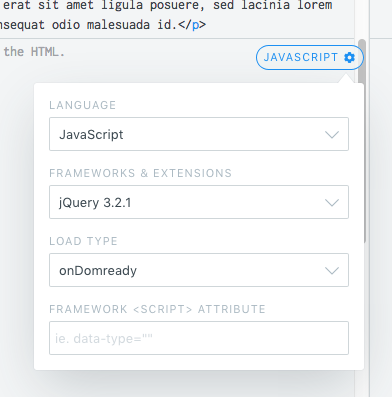
            jQuery 1.9.1 was already included in your fiddle. When changing it to 3.2.1 there instead of including it with a script tag, everything seems to be working.

            http://jsfiddle.net/gakropzo/2/

            https://uploads.disquscdn.com/images/8570535c22a503edf11ae4bb26d744f81a2f9be203c20d48f82f6228ad9b9ec3.png


  8. a n onymous

    |

    Is there an example of using the boost module with a line chart with thousands of points that is also a live, rapidly updating chart (e.g., couple hundred points a second sliced and added)?


  9. Lucas

    |

    Hi, with this boost i can render higmaps points? Thz


Leave a Reply to SuryaMDV Cancel reply

Your email address will not be published. Required fields are marked *

This site uses Akismet to reduce spam. Learn how your comment data is processed.